The introduction of the M1 and M2 chips has transformed how you experience laptops. These chips boost performance significantly, making tasks smoother and faster. For instance, the Apple M2 chip shows an 18% improvement in Geekbench 5 benchmarks compared to its predecessor. This leap in technology not only enhances everyday tasks but also elevates gaming and creative work. With the MacBook Air and MacBook Pro now powered by these chips, you can enjoy longer battery life and better graphics. Overall, M1 and M2 chips redefine what you can expect from a laptop.
Performance of M1 and M2 Chips
CPU Enhancements
The M1 and M2 chips represent a significant leap in CPU performance. You will notice faster processing speeds and improved efficiency in your daily tasks. The M2 chip, for instance, features enhanced performance cores that provide an 18% boost for multithreaded workloads compared to the M1 chip. This improvement means you can run multiple applications simultaneously without experiencing lag.
Here’s a quick comparison of the key architectural differences between the M1 and M2 CPUs:
Feature | M1 | M2 |
|---|---|---|
Transistor Count | 16 billion | 20 billion (25% increase) |
Memory Bandwidth | Lower than M2 | Higher memory bandwidth |
Maximum Memory | 16GB | 24GB |
Core Performance | Standard performance | Enhanced performance cores with 18% boost for multithreaded workloads |
Production Process | First-generation 5nm | Second-generation 5nm |
This table highlights how the M2 chip’s architecture allows for better performance metrics, especially in demanding tasks.
Energy Efficiency
Energy efficiency is another area where the M1 and M2 chips excel. Both chips operate efficiently under typical workloads, consuming power levels from just a few watts to around 20 watts. This efficiency translates to longer battery life for your MacBook Air or MacBook Pro.
The M2 chip achieves nearly 90% of the peak performance of a 12-core PC chip while consuming only one-fourth of the power.
Users have reported that the M1 chip allows for complex tasks to be performed with significantly lower energy consumption, reducing the need for loud fan operation.
In terms of thermal performance, the M1 chip runs silently, making it ideal for quiet environments. The M2 chip shows improved thermal management, although high-workload tasks may generate more heat.
Both chips also feature advanced neural processing units that enhance machine learning capabilities. The M1 chip has a 16-core Neural Engine with a peak performance of 11 TOPS, while the M2 chip boasts a more advanced 16-core Neural Engine that achieves a peak performance of 16 TOPS. This improvement indicates a significant enhancement in AI processing capabilities, making your laptop more adept at handling deep learning tasks.
Graphics Performance of Apple M2
M2 Graphics vs. M1
The Apple M2 chip brings significant advancements in graphics performance compared to the M1 chip. You will notice a boost in visual capabilities, especially in demanding applications. The M2 chip features a higher GPU core count, which enhances its ability to handle graphics-intensive tasks. Here’s a quick comparison of the GPU specifications:
Chip | GPU Core Count | Clock Speed |
|---|---|---|
M1 | 8 | N/A |
M2 | 10 | N/A |
This increase in GPU cores allows the M2 to deliver smoother graphics and better frame rates in various applications.
In benchmark tests, the M2 chip outperforms the M1 significantly. For instance, in GFXBench tests, the M2 achieves impressive frame rates in demanding scenarios:
GPU Model | Benchmark Type | Min FPS | Avg FPS | Median FPS | Max FPS |
|---|---|---|---|---|---|
Apple M1 8-Core | GFXBench Car Chase Offscreen | 150 | 167.4 | 165.1 | 197 |
Apple M2 10-Core | GFXBench Car Chase Offscreen | N/A | 585 | N/A | N/A |
Apple M1 8-Core | GFXBench Manhattan ES 3.1 Offscreen | 216 | 248.2 | 248.7 | 275 |
Apple M2 10-Core | GFXBench Manhattan ES 3.1 Offscreen | N/A | N/A | N/A | N/A |
These results indicate that the M2 chip can handle more complex graphics tasks with ease.
Impact on Creators
For creators, the M2 chip offers substantial benefits. Video editors and graphic designers will appreciate the faster rendering times and improved workflow efficiency. The M2 chip reduces average rendering time for 4K UHD video projects:
Chip | Average Rendering Time (4K UHD) |
|---|---|
M1 Max | 1 minute 32 seconds |
M2 Max | 1 minute 25-30 seconds |
This improvement allows you to complete projects more quickly, freeing up time for creativity.
In addition, the M2 chip enhances performance in 3D modeling and animation tasks. Users report that the M2 chip provides better graphics performance and efficiency, making it ideal for complex 3D rendering. The MacBook with the M2 chip is well-suited for demanding software, thanks to its powerful processors and ample RAM.
The M2 chip offers a performance speed boost of 1.4x over the M1 chip.
It is 15x faster than the Intel Mac model.
It provides up to 18 hours of battery life, which is beneficial for intensive tasks like 3D rendering.
Overall, the M2 chip significantly enhances the creative experience, allowing you to tackle more complex projects with ease.
M1 and M2 Comparison
Benchmark Insights
When comparing the M1 and M2 chips, benchmark results reveal significant performance differences. The following table summarizes key scores from standardized tests:
Test Type | M1 Score | M2 Score | Performance Increase |
|---|---|---|---|
Geekbench (Single) | 2380 | 2607 | 9.5% |
Geekbench (Multi) | 8761 | 9707 | 10.8% |
Cinebench (Single) | 110 | 119 | 8.2% |
Cinebench (Multi) | 458 | 534 | 16.6% |
Geekbench Metal | 30948 | 40066 | 29.5% |
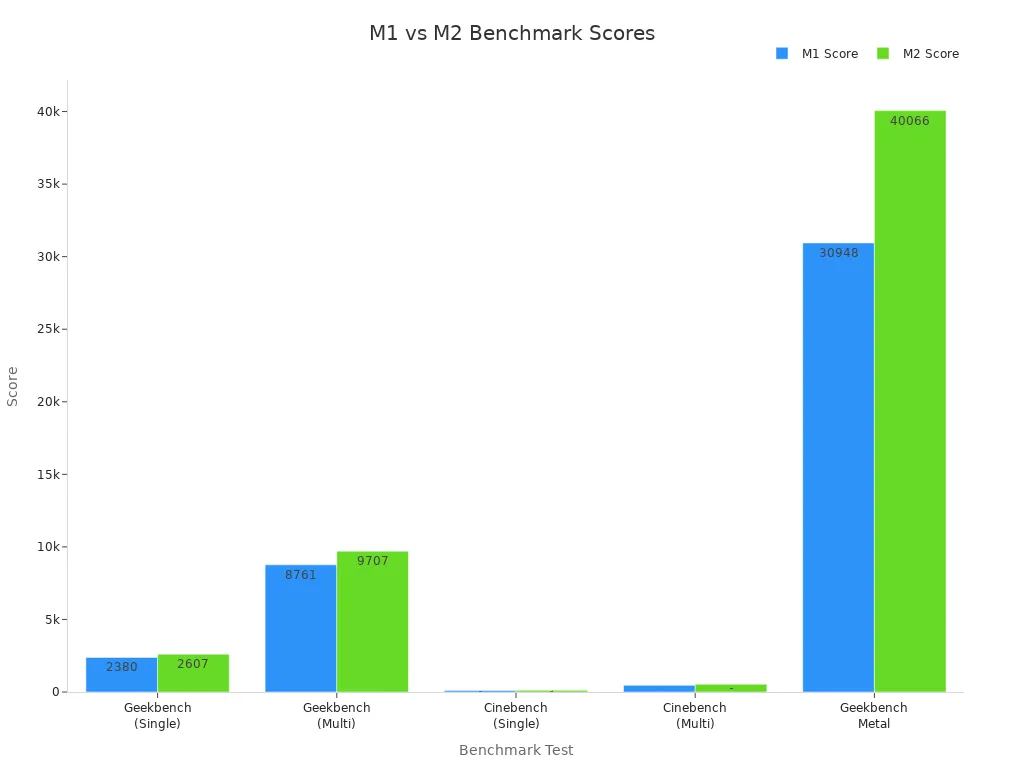
These results show that the M2 chip outperforms the M1 in various tasks, especially in multi-core scenarios.
Memory and Multitasking
The M2 chip supports a maximum RAM capacity of 24 GB, compared to the M1’s 16 GB. This increase in memory allows for better multitasking capabilities. Here’s a quick look at the memory specifications:
Chip | Maximum RAM Capacity |
|---|---|
M1 | Not specified |
M2 | 24 GB |
You will find that both chips perform well in everyday tasks like web browsing, coding, and video conferencing. However, the M2 chip shows slight improvements in specific scenarios. Typical tasks include:
Writing essays
Running multiple Chrome tabs
Attending virtual classes
Editing multimedia projects
Users report that both chips deliver nearly identical experiences in these areas.
Maria, a freelance writer, upgraded from an M1 MacBook Air to the M2 model. She noted, “The M2 felt slightly snappier when switching between large browser sessions, but the difference was marginal.”
In terms of multitasking, both chips handle tasks like streaming, writing documents, and video calls effectively. The M2 chip’s increased memory bandwidth of 100 GB/s compared to the M1’s 68.25 GB/s enhances performance in professional applications, making it ideal for users who require efficient multitasking.
The introduction of the M1 and M2 chips has significantly enhanced your laptop experience. These chips offer impressive performance, energy efficiency, and advanced machine learning capabilities. As a result, Apple laptops have gained a strong reputation in the consumer electronics market. For instance, the M2 MacBook Air ranks among the highest-rated models, combining speed, battery life, and display quality. In 2024, Apple’s Mac segment revenue reached $7.5 billion, reflecting a growing demand for M1 and M2 models. You can expect these laptops to maintain higher resale values compared to Intel-based models, making them a smart investment.