Maintaining your smartphone plays a crucial role in extending the life and performance of your device. Many users encounter problems like battery drain, slow performance, or physical damage. By adopting simple practices to maintain your smartphone, you can significantly improve its reliability. For instance, charging your phone between 20%-80% and using a protective case can prevent common issues and enhance battery health.
Key Takeaways
Invest in a quality case and screen protector to prevent damage from drops and scratches.
Charge your smartphone between 20% and 80% to extend battery life and health.
Regularly update your software to enhance performance and security.
Tips for Physical Care
Protecting Your Device
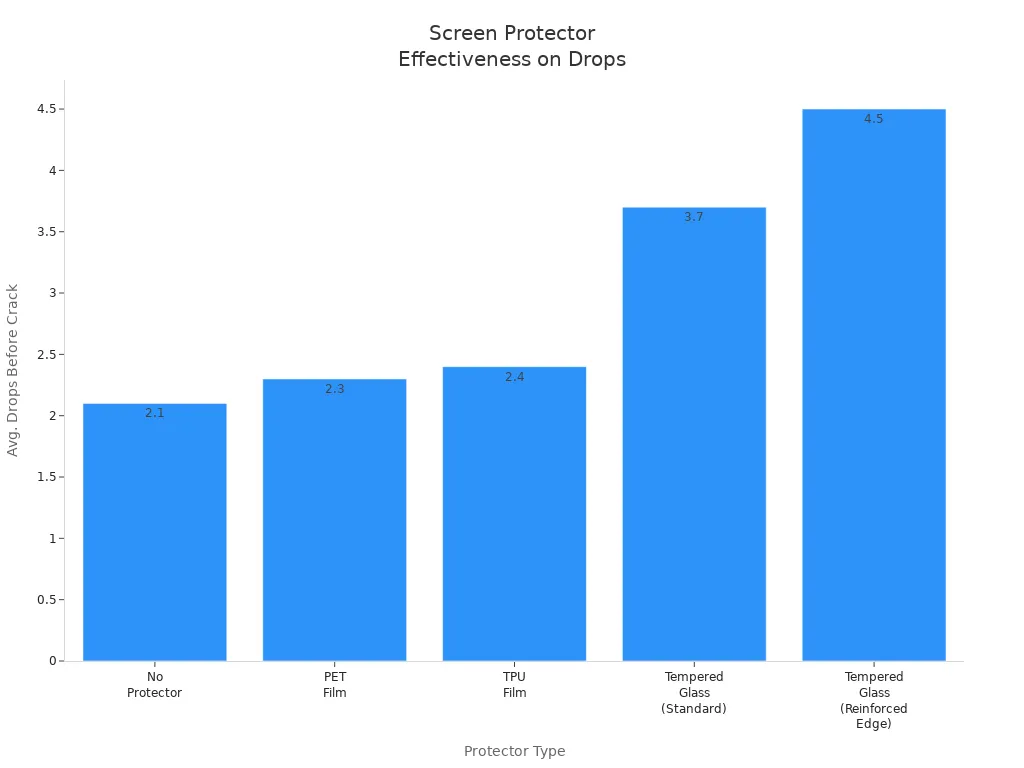
To keep your smartphone safe, you should invest in a good case and a screen protector. These accessories can significantly reduce the risk of damage from drops and scratches. For example, a tempered glass screen protector can withstand more drops than a phone without any protection. Here’s a quick comparison of different types of screen protectors:
Type | Drops Before Crack (Avg.) | Scratch Resistance | Post-Drop Clarity |
|---|---|---|---|
No Protector | 2.1 | Good | N/A |
PET Film | 2.3 | Fair | No change |
TPU Film | 2.4 | Good (self-heals minor marks) | No change |
Tempered Glass (Standard) | 3.7 | Excellent | Cracked protector, screen intact |
Tempered Glass (Reinforced Edge) | 4.5 | Excellent | Protector shattered, screen unharmed |
Additionally, avoid exposing your smartphone to extreme temperatures. High heat can damage the battery health and internal components. Always store your device in a cool, dry place.
Cleaning Your Smartphone
Regular cleaning keeps your smartphone looking new and functioning well. You should clean your device at least twice a week. If you can, daily cleaning is even better. Here are some tips for effective cleaning:
Use 70% isopropyl alcohol wipes (not higher).
Clean with soft microfiber cloths.
Use anti-static soft-bristled brushes for delicate areas.
Avoid spraying liquid directly onto the phone.
Do not submerge the phone in cleaning solutions.
Refrain from using paper towels or rough cloths.
Remember to remove the phone from its case before cleaning. Over-cleaning can damage screen coatings, so be cautious. Following these tips will help maintain your smartphone’s appearance and performance.
Extend Battery Life

Charging Best Practices
To extend battery life, you must adopt smart charging habits. Here are some best practices to follow:
Avoid extreme battery levels: Keep your battery level between 20% and 80%. This range reduces stress on the battery and helps maintain its health.
Limit overnight charging: Charging your smartphone overnight can lead to unnecessary wear. It’s better to charge your phone during the day when you can monitor it.
Snack charging: Instead of letting your battery drain to low levels, give it short top-ups throughout the day. Charging for 15-20 minutes can keep your battery in a healthy range.
Enable the 80% limit feature: Some smartphones allow you to set a limit on charging. This feature stops charging at 80%, which helps prolong battery life.
Lithium-ion batteries are sensitive to temperature changes. High temperatures can speed up chemical reactions, leading to faster degradation. This can cause physical damage, such as swelling or leaking. On the other hand, low temperatures slow down ion movement, temporarily reducing capacity. Therefore, avoid exposing your smartphone to extreme temperatures to maintain battery health.
Battery Health Monitoring
Monitoring your battery health is crucial for long-term battery care. Here are some tips to help you check battery health effectively:
Use dedicated apps: Consider using apps like Accubattery or Phonecheck. These tools provide insights into your battery’s health and performance.
Look for warning signs: Be aware of signs that indicate declining battery health. These include:
Faster battery drain than when the device was new
Longer charging times, especially in the last 20% of charge
Unexpected shutdowns with battery indicator showing 10-30% remaining
Overheating during normal tasks
Physical swelling or bulging of the battery
By keeping an eye on these signs, you can take action before your battery health declines too much. Regularly checking your battery health helps you make informed decisions about when to replace your battery or adjust your usage habits.
Optimize Software Performance
Regular Updates
Keeping your smartphone updated is essential for maintaining its performance and security. Regular software updates can significantly enhance your device in several ways:
Fix Bugs: Updates often address bugs and glitches that slow down your smartphone. By installing these updates, you can enjoy a smoother experience.
Enhance Security: Developers continuously improve security measures through updates. This helps protect your device against evolving threats and vulnerabilities.
Optimize Performance: Updates ensure compatibility with new technologies. This means your smartphone can run the latest apps and features without issues.
Delaying updates can lead to serious problems. Outdated operating systems can make your smartphone feel sluggish and limit its functionality. You may find that critical apps become unavailable as software support ceases. This can render your device obsolete, even if the hardware is still functional.
Consider the risks of delaying updates:
Data Theft: Personal information becomes accessible to cybercriminals.
Malware Attacks: Known vulnerabilities are exploited, leading to potential data loss.
Identity Theft: Your personal data can be used for fraudulent activities.
To avoid these risks, regularly check for updates and install them promptly. This simple habit can keep your smartphone running smoothly and securely.
App Management
Managing your apps effectively can also boost your smartphone’s performance. Many users have numerous apps installed, but not all are actively used. In fact, the average person has over 80 apps on their phone, yet only uses about 9 daily. This means that many apps sit unused, taking up valuable storage space and potentially running background processes that slow down your device.
Here are some tips for effective app management:
Remove Unused Apps: Regularly evaluate your apps and remove those you no longer use. This frees up storage and enhances overall responsiveness.
Limit Background Processes: Some apps run in the background, consuming resources. You can manage these settings in your smartphone’s app settings to improve performance.
Organize Your Home Screen: Keep frequently used apps easily accessible. This not only helps you find them quickly but also reduces clutter.
By managing your apps wisely, you can significantly improve your smartphone’s performance. Regularly removing apps you don’t use contributes to a smoother device experience and helps maintain battery health.
Enhance Smartphone Performance
Storage Management
Effective storage management is vital for maintaining your smartphone’s performance. When your device’s storage is nearly full, it can slow down significantly. To prevent this, follow these tips:
Clear cached data regularly to reclaim storage space.
Transfer large media files, like photos and videos, to cloud storage or external devices.
Uninstall unused applications to free up considerable space.
Utilize storage optimization tools to identify and remove unnecessary files.
Maintaining at least 10–15% of your phone’s storage free is crucial for optimal speeds. Regularly deleting unused apps and clearing cached data can significantly improve performance, especially when your phone operates at high storage capacities.
Background Processes
Background processes can drain your battery and slow down your smartphone. Many apps run in the background, consuming resources even when you are not using them. Here are some common culprits:
Social media apps frequently sync data and send notifications.
Streaming apps maintain constant network communication.
Navigation apps use GPS and data, which can drain battery life.
To enhance performance, manage these background processes. You can limit which apps run in the background through your device settings. This action not only improves speed but also helps maintain battery health.
Additionally, consider enabling dark mode on your smartphone. On OLED screens, dark mode can save battery life by reducing the power used for bright pixels. Users can achieve battery savings of 15-25% during typical use, especially at higher brightness levels.
To maintain your smartphone’s longevity and performance, follow these key practices:
Protect your device with a quality case and screen protector.
Charge your phone partially, ideally between 20% and 80%.
Keep your software updated for better security and performance.
Regular cleaning helps maintain appearance and functionality.
Adopting these habits will enhance your smartphone experience and support battery health.
FAQ
How can I improve my smartphone’s battery health?
You can improve battery health by avoiding extreme temperatures and charging your phone between 20% and 80%.
How often should I clean my smartphone?
Clean your smartphone at least twice a week to maintain its appearance and functionality.
What should I do if my smartphone is slow?
Remove unused apps and clear cached data to enhance your smartphone’s performance.